// roost — your coding sessions, mustered
You can already build it. This is how it stops looking amateur.
When the project is a client site, Roost carries the B.R.A.N.D method into it — the five-move playbook behind our own client builds, written into the project for that exact job. You are not a designer. You do not have to be.
And every project opens where you left it — its own window, in its place, with last week's decisions still loaded. Mark the ones that matter and they start themselves in the morning, before you have opened your inbox.
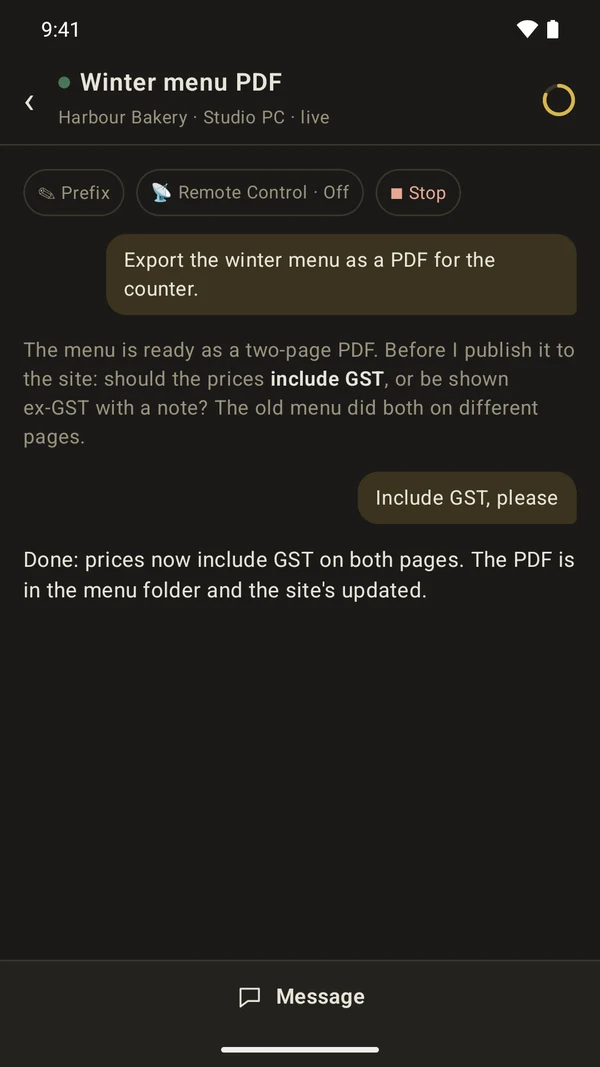
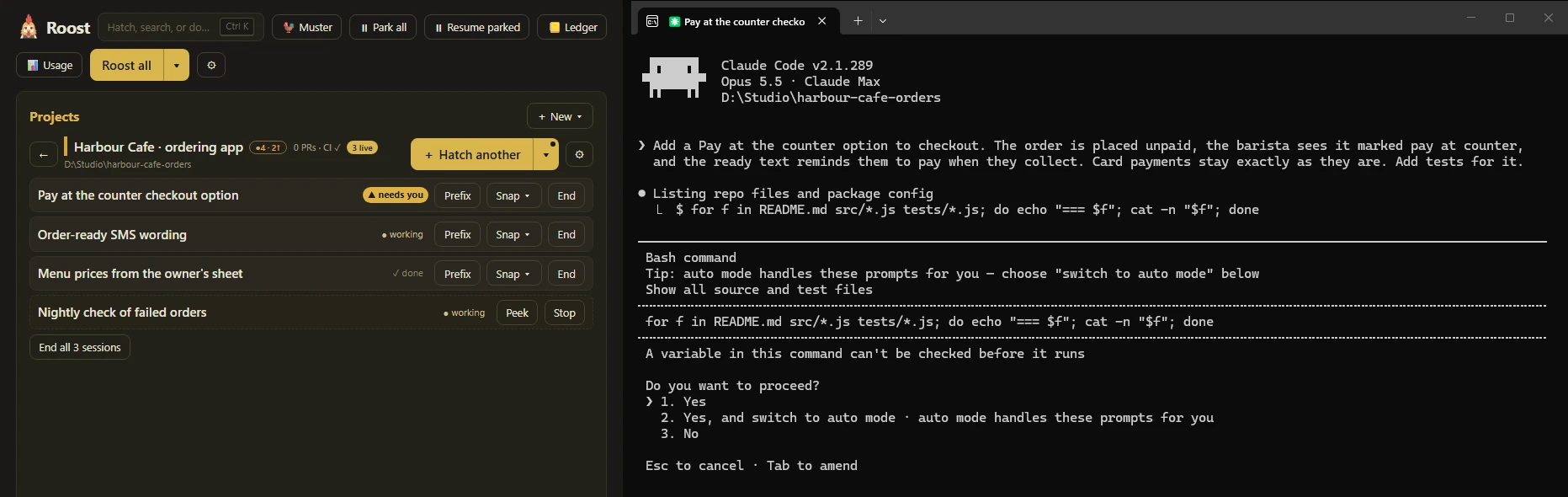
 The phone half, for Android: it tells you when a session needs you, and you answer it from anywhere.
Free — no account needed · Windows 10 / 11 · works with Claude Code or any CLI
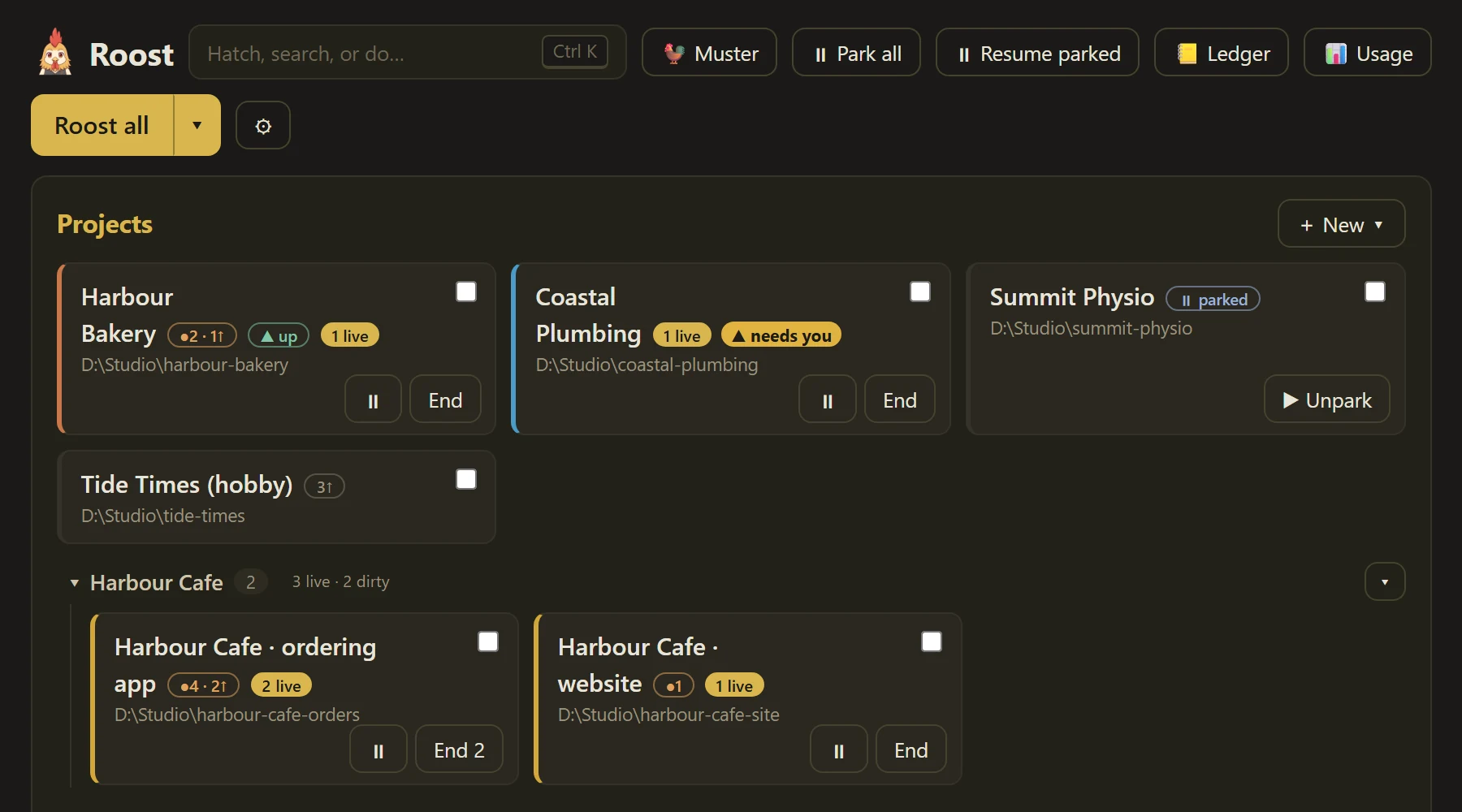
The sessions you don’t open are the clients that slip.
When you freelance across half a dozen repos, every morning starts the same way: open a terminal, cd into a project, start Claude, drag the window somewhere useful — then do it again, and again. By the fourth project you’ve skipped one, and it’s always the client you least wanted to keep waiting. The setup between you and the work is where the day leaks out.
// how it works
From sign-in to a working fleet, hands-free.
Line up your clients
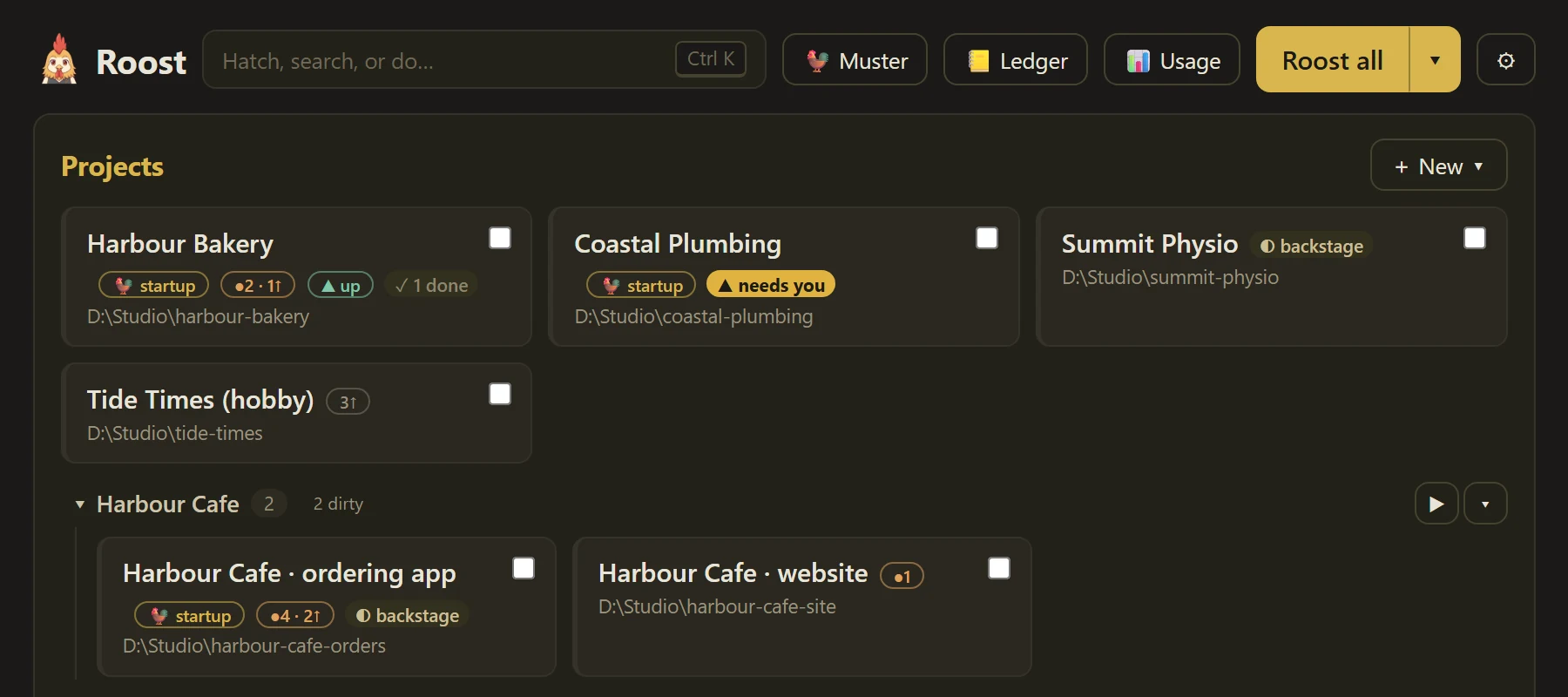
Group projects by client and drag them where they belong — or point Roost at a folder and it finds every project inside it for you.
One click, and you are in
The project opens in the right place, on the right screen, already pointed at the right work. Nothing to type and no windows to arrange.
Morning muster
Projects marked for startup launch themselves at Windows sign-in — each with an optional standing first instruction handed straight to Claude.
Pick any of them back up
Every project in one place, and each one carries on from where it stopped rather than starting over. Roost sits in the tray and keeps track while you work.
Started before you sat down. Answered from anywhere.
// running work for a dozen clients?
Built for freelancers who run a portfolio, not a project.
Roost is the tool we built for our own freelance bench — people delivering for several clients at once, each with its own repo, its own context, its own half-open conversation with Claude. Group projects by client, give each one a perch on your monitors, and treat your mornings like a muster instead of a scavenger hunt.
// the part you can’t download from anyone else
Roost carries the B.R.A.N.D method.
Anyone can ask an AI to build a website. What they can’t ask it for is the order, the gates and the failure modes — years of client builds distilled into five moves that turn a business into a site that is unmistakably, findably theirs. The method comes down from DiscoverWorthy to Roost the moment you sign in, written into each client’s project folder for that exact job, and it is published nowhere.
Build
A real visual identity pulled from the brand’s own artifacts, pages written from the actual business, a homepage hero that gets its own pass — and a design crit that fails anything merely correct.
Release
Live, deploying on every push, and crawled — so the platform knows what the site is about and the rest of the method has something real to work on.
Architect
The topics DiscoverWorthy detects become pillar pages, clusters and a genuinely connected internal structure. This is where a redesign earns its fee.
Nail
Digital Identity Score past 95 for Google and answer engines alike, conversions tracked first-party, a lead magnet that captures, and the print-to-QR bridge.
Deliver
A site the client edits themselves, handed over clean, with nothing left quietly rotting behind it.
Every letter ends at a gate: the build stops, reports what shipped, and waits for you to say go. That pacing is half of why the output is good — and it is the part a “build me a website” prompt never does.
What the method is, letter by letter
The app is free · the method comes with the Freelancer plan
// wired into DiscoverWorthy
Your client sites, with the work already scoped.
Roost isn’t just a launcher — it knows which projects are DiscoverWorthy managed-hosting sites, how set up each one is, and what would move its score. Two focused sessions turn that into billable progress.

See your Rigg sites at a glance
Projects wired to Rigg — the DiscoverWorthy MCP for managed-hosting sites — wear a badge on the roster. Open one and Roost shows the site behind it: setup checklist, score, the works.
🐥 Fledge — finish the setup
Images and text in the CMS, custom domain live, Signals wired, blog publishing. One click spawns a Claude Code session already pointed at whichever checks are still failing, and it works the list until the site is flight-ready.
⚡ DIS to 100
Every site carries a Digital Identity Score. The DIS session pulls the latest score and findings through Rigg, fixes the highest-impact SEO and AEO items, redeploys and re-scores — and keeps going while the number climbs.
// and the rest of your stack
Just as sharp on the projects that aren’t sites.
SaaS products, client integrations, plain repos — Roost is a dev cockpit for all of it, and a back office for the freelancing around it.
The roster tells the truth
Every tile wears its state: uncommitted files, unpushed commits, the branch you left it on, CI and open PRs, even a ▲/▼ health ping for your own SaaS. Friday’s loose ends are visible Monday, before you open a thing.
Flocks & session recipes
One click hatches the whole working set — Claude, dev server, log tail — tiled together. Built-in focused sessions (Catch-up, Housekeeping, Release) plus your own recipes per project: name a prompt, get a button.
The work invoices itself
Sessions keep a private per-client work log. At month end, the Ledger rolls it up across every client — and the Invoice session turns any client’s month into a ready-to-send draft with plain-language line items at your rate.
// the details that matter
A launcher that respects how you actually work.
Tiling that fits your desk
Full-width strips on portrait monitors, a grid on landscape — and a per-project “perch” so each session lands where you expect it, every time.
Any CLI, not just Claude
The per-project command defaults to claude but runs anything — aider, npm run dev, or a plain shell. One roster for everything you keep open.
Local and legible
The roster is a hand-editable JSON file on your machine, and your projects and sessions never leave it. Nothing to sign up for and nothing phoning home — it all stays on your desk, in signed builds that keep themselves up to date.
// installing
Up and running in a minute.
- Check the prerequisites. Roost drives Windows Terminal and, by default, Claude Code (
npm install -g @anthropic-ai/claude-code). Both installed? You’re ready. - Run the installer. It’s code-signed, so Windows shows Discover Worthy Pty Ltd as the verified publisher. On a brand-new release Windows may still say “Windows protected your PC” while the download builds reputation — click More info → Run anyway.
- Add your projects. Create them one by one — Roost can scaffold the folder with a starter CLAUDE.md — or scan an existing folder and import every git repo inside. Mark your daily drivers as startup projects and tomorrow begins with the muster. No account, no sign-in: the launcher is yours from the moment it installs.
- Sign in whenever you want the rest. Roost Mobile, the B.R.A.N.D method and DIS to 100 come with the DiscoverWorthy Freelancer plan. Open the settings menu, enter your account email and the 6-digit code from your inbox, and the licensed half switches on — it stays on while your plan is in good standing, even through a few days offline. Skip this step and everything above keeps working.
// start here
Tomorrow morning, start already started.
Free to download, free to run — quietly setting up your whole day’s work from the moment you sign in to Windows.
Free · Signed by Discover Worthy Pty Ltd · Windows 10 / 11 · auto-updates